Showing posts with label Mobile Apps. Show all posts

Sunday, December 29, 2013

Install WhatsApp mobile application on your PC

WhatsApp is a mobile platform messaging app  available for Android,Nokia,iPhone,BlackBerry and This messenger is used to send messages free of cost over Internet(DATA Pack Required) by synchronizing with your mobile number.This is basically used now a days only on Mobile device. But today I am going to tell you very smart way to install this apps on PC.

There are 2 method to use Whats App service on PC
1) Using Android Emulator called Blue
2) Using Wassapp client for Whats App


1) Using Android Emulator called Blue
BlueStack is an Android emulator that lets us install and use almost all Android apps and games on a PC.  This is how we’ll avail WhatsApp for PC using this android emulator.It has MAC version also.  BlueStack works on all operating systems i.e., Windows XP, Windows Vista,Windows 7, and Windows 8

One you have installed Bluestacks visit search bar that appears, type WhatsApp or WhatsApp for PC. The search engine searches for the keyword in Google Play, one mobile and the Amazon App Store

 choose WhatsApp Messenger from the 1 mobile store. You then need to click install button against

Once done You will now find WhatsApp installed in you ‘My Apps’ tab. You are just one step behind; i.e., configuring your WhatsApp account

Read More

Friday, September 20, 2013

Google make Quick office Free for Android and iOS for Everyone


Google is putting extra effort  to make it easier for everyone to work together Free of Cost.
On Thursday Google  announced that its Quickoffice mobile app, for viewing and editing Microsoft Office files, is now free to anyone with a Google account on Android and iOS. Earlier, the app was only free to Google Apps for Business subscribers -- everyone else had to shell out $14.99 for the pro version or $19.99 for the pro HD version.


With this offer Google is offering an extra 10GB of Google Drive storage for the next two years to anyone who signs up their Google account for the new Quickoffice app by September 26.. Quickoffice is integrated with Google Drive so you can safely and easily store and access your files across devices. Users who currently have Quickoffice for Google Apps for Business can update their app to the new version and will notice a new icon.Quick office apps can be downloaded freely from Google Play and iStore
Read More

Sunday, June 30, 2013

Airtel present FREE Data charge for Google Product

Airtel and Google presents Free Zone , an innovative service that allows you to access Google mobile services on the go at absolutely no data costs! The free data usage on Free Zone is available up to a limit of 1GB per month.This service is free only in Home Network Now with your internet-enabled mobile on the airtel network. This Free service will work only in India. If you are on International Romaing then this FREE service will not available

Search on Google and browse the internet for FREE

When you click on a link in the search results page, you don’t pay anything. The first page(s) linking from Google Search are free, for pages thereafter you will need to pay for data usage (but don’t worry, before you are charged, you will see a warning page with the option to sign up for a data plan if you want.) So for example, if you click on a search link to a Wikipedia article, you won’t pay anything. But if you click on a link within the article, you will be charged for the data costs incurred for loading that link.

Send and read emails on Gmail for FREE

Users can have unlimited access to Gmail from their mobile browser but if they click on a link or attachment within the email they are directed to a page where they can purchase a data package.

Stay connected with your friends on Google+ for FREE
If you click on a link that takes you outside Google+ or Gmail or if you want to view an email attachment, you will need to pay data charges. Before you are charged, you will see a notification page, you can purchase a data plan or you can proceed further with the default pay-as-you use data charges.
want to know more? watch a video!
https://docs.google.com/open?id=0B2PxoDVbIaQQQlItWGhuUUpWT28

https://docs.google.com/open?id=0B2PxoDVbIaQQZzFneThJTkM5Z2c

How can I get started?

Just visit http://airtel.in/freezone from your phone’s internet browser.
Then start searching or sign in with your Google account to access Gmail or Google+


Read More

Saturday, June 1, 2013

WeChat : No Text charge No voice charge ,Free Communication:Next generation Multimedia communication

WeChat is a mobile phone text and voice messaging communication service developed by Tencent in China. This is next generation communcation method where you need not to pay for your SMS or you need not to worry about your call rate whether it is STD or Local call.Currently this is available for Android, iPhone, BlackBerry, Windows Phone, and Symbian platforms. Languages supported include traditional/simplified Chinese, English, Indonesian, Spanish, Portuguese, Thai, Vietnamese, and Russian. WeChat is supported on Wi-Fi, 2G, 3G, and 4G data networks WeChat still operates for free all you need to have just DATA pack of your Mobile operator

WeChat provides multimedia communication with text messaging, hold-to-talk voice messaging, broadcast (one-to-many) messaging, photo/video sharing, location sharing, and contact information exchange. WeChat supports social networking via shared streaming content feeds and location-based social plug-ins  to chat with and connect with local and international WeChat users.

Photos can be taken and embellished with artistic filters, captioned and put into a personal photo journal, and distributed to friends. User data is protected via on-demand contact list backup and retrieval to/from a cloud-based service. WeChat claims to provide a social networking platform that emphasizes user privacy and fast response performance.
In India it is being promoted in India via gaming site Ibibo.The app is available in the App Store for iTunes, Google Play Store for Android, BlackBerry App World and Marketplace for Windows Phone.
Currently As of January 2013, it had 300 million.Today  It has influence in Mainland China, HK, Taiwan, South-East Asia, Chinese People areas around the world and westerners.
Read More

Monday, April 15, 2013

Indian Postal Department started Mobile Money Transfer Service (MMTS) using Cellphone

DOP money remittance is a mobile application that enables us with immediate money transfer from one place to another place using mobile, through Indian post offices. The process for money transfer is very simple to understand and follow. For this initiative, India's oldest and largest communication service provider (CSP), BSNL will provide mobile connections to DOP’s designated officials and BSNL will bring Global technology for Mobile Money Transfer.Currently this service is available in limited state under few Post Office.to check the availablity of the service in your post office just visit http://dopmobile.in and search using your state with PIN code or Post office name.

DOP Mobile Money Transfer is a service that enables instant money transfer from one place to another place using mobile, through Indian post offices. The consumer just needs to have a mobile while the actual transmission of the money is initiated by the Postal Assistant, using his/her special handset. The process for money transfer is very simple to understand and follow. The remitter (sender) can submit money (Cash In) at any of the covered post office and automatically, the amount is transferred to a central position, which can be collected by recipient customer (Cash Out) from any of the covered Post offices. As soon as the Cash in happens, both the sender and the recipient get a SMS on their mobile phones. The sender gets a Transaction ID and a Six (6) digit secret code in the SMS while the Recipient only gets the Transaction ID. Recipient can claim the money from any of the covered Post Offices by showing the Transaction ID that he receives on his mobile in the SMS and the Secret code, which he gets from the sender. In order to make process smooth and convenient, a notification sms is being sent to remitter as well as to recipient regarding transaction irrespective of their telecom operator.

For this initiative, India's pioneer and largest communication service provider (CSP), BSNL will provide mobile connections to DOP’s designated officials and BSNL will bring Global technology for Mobile Money Transfer. Each Post office shall be provided with a mobile handset with pre loaded application by BSNL’s technology partner M/s Maverick Mobile Solutions.
   
Point to Remember

1) As soon as the recipient receives a notification sms with transaction Id and secret code from the sender, he/she can collect money at destination post office.

2) You can go to any covered post office for Cash Out. It is not necessary to go to a particular post office. All you need to have is the Transaction ID and the Secret Code

3) No limit on the number of transactions. However the minimum amount is 1,000 rupees while the maximum is 10,000 rupees.
Transaction Charge Applied:
Slab                                   Fee(Rs.)                           Tax(Rs.)
1000-1500                          40                                         5
15001-5000                        70                                         9
5001-10000                        100                                     12

4) The sender must inform to the Cash In postal assistant regarding this so that he/ she will resend the same.

5) The recipient must collect money within 14 days of transaction.

6)In case the recipient does not Cash Out the amount within 14 days, the amount is sent back to the sender and a ‘Cash In reversal’ SMS with new transaction-id will be sent to remitter. The remitter can withdraw money within 7 days (prescribed) after this SMS.

Read More

Thursday, February 7, 2013

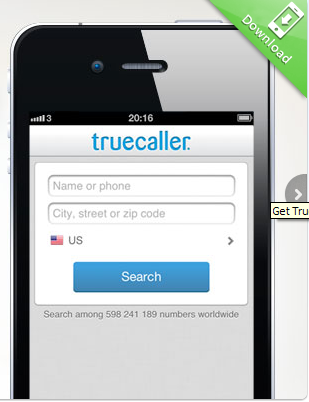
Get Caller ID for Unkown number across the World: TrueCaller-World wide Phone directory

Truecaller is a global phonebook service which brings all the contact information of the world into your smartphone and online. In addition to its worldwide number lookup service, Truecaller can help you block unwanted calls, keep your phonebook up to date with current information and even map your phonebook with the social networks you use regularly. Truecaller was developed by True Software Scandinavia AB, a privately held company in Stockholm, Sweden founded by Alan Mamedi and Nami Zarringhalam in 2009.

Currently this application is supported on  IPhone, Android, BlackBerry, Symbian and Windows Phone.Apart from mobile applications you visit online at http://www.truecaller.com
Visit this site and enter the phone number,ensure that you select correct country in drop down.after entering the detail you will asked to login using YAHOO/GOOGLE/FACEBOOK account just login and get the search result. Here I would like to add to Indian user that for INDIAN phone number this might not work correct for all phone number. for Indian phone number  because  database is all based on crowd-data that means if some one has sync his /her phone number with truecaller then it possible that your number can be searchable.so finally you can't relay fully on this search result.Suppose someone using this application and he has allowed to sync the phone book with database of True caller then all his phone book will get added to True caller database. Since in India there is no Public mobile phone directory so relevancy of the search number may not be always correct. Some time if someone has added some nick name or wrong name with his friend phone number in his mobile phone book then same it will be get added to true caller database after sync and it will be visible as nick name while searching.

It is supported everywhere in the world.
Truecaller caller id will only be activated on incoming or outgoing calls where the number isn't previously stored on your phonebook. (Some limitations like hidden numbers or smartphone platform restrictions apply)
If the user want to opt out from our database whenever they feel uncomfortable being in our database. They can unlist your number from ou website: http://www.truecaller.com/unlist
Please remember to add your country code, for instance +46707420478.
Note: This does not affect results presented by partnering whitepages directories. And it may take up to 48 hours before it's removed from their database.

Read More

Tuesday, July 24, 2012

How to Track Stolen Mobile/Laptop/Computer for FREE

Prey lets you keep track of your laptop, phone and tablet whenever stolen or missing -- easily and all in one place. It's lightweight, open source software that gives you full and remote control, 24/7.
Basically you install a tiny agent in your PC or phone, which silently waits for a remote signal to wake up and work its magic.This signal is sent either from the Internet or through an SMS message, and allows you to gather information regarding the device's location, hardware and network status, and optionally trigger specific actions on. You can download this simple application at here

You can quickly find out where your computer is located, who's using it, and what he's doing on it thanks to Prey's powerful reports system.

By marking your device as missing, Prey will gather all the evidence you request and send it either to your Control Panel account or directly to your mailbox, depending on the reporting method you choose.
Read More

Saturday, July 21, 2012

How to transfer Phonebook contact from one phone to another


I came across very interesting scenario where I was suppose to transfer contact of a NOKIA phone to Blackberry/Android. First method that came in mind is just copy the contact to SIM memory and then tranfer to another phone. Here I am going to explain few method by which you can transfer your contact from one phone to another.Now a day people switching to smartphone then it become cumbersome to copy so much contact one by by so I am going to present few method which will help you to easily switch to smart phones.

1) Transfer Contact using SIM memory: In this method if you have limited contact on phone memory say like less than 200 contact then you just need to COPY/MOVE all your contact from OLD phone to SIM memory. Now you can place the SIM on new PHONE and start using.Here I want to state that you can even COPY/MOVE the content of SIM to NEW phone book.If you have more than 200 contact including SIM and PHONE book  then first  you need to MOVE the contact of existing  SIM memory and then place the SIM on new phone there you need to MOVE content from SIM to NEW PHONE.Once the SIM content is empty now place the SIM on OLD phone move the PHONE book content on to SIM and again place the SIM to new PHONE and move the content to new phone book, continue this process until your OLD phonebook get empty.

2) Transfer using Computer: The SIM card based approach is good when transferring basic phone numbers but if your phone’s address book includes long names, email addresses,then you need corresponding phone application to transfer.For instance if you have a NOKIA phone and you are shifting to BLACKBERRY or iPHONE or ANDRIOD then use NOKIA OviSuit application to copy your phone'address book to Microsoft Outlook on your desktop. Once it is copied to to your Outlook then you can use BLACKBERRY Desktop Manager software or HTC sync or iTunes in case of iPHONE or Kies for Samsung glaxy to Transfer from Outlook(PC) to your new phone's address book
Windows Mobile users, like Samsung Omnia or HTC HD2, may again use Microsoft’s Device Center (or ActiveSync for XP) to copy their phone address book to the desktop via Outlook. If you are simply switching from one Windows Phone to another, you can transfer contacts via the cloud itself using Microsoft’s My Phone service.

3) Transfer using Cloud : If you have internet enable handset  then you can copy your old phone contat to new phone over cloud without even a computer. A online seriver called Mobical which is free and works with moost of mobile phone form NOKIA,Motorola.SONY etc.All you need to setup  MOBICAL on old phone and will create back up of your phone on cloud, Now setup Mobical on the new phone using same  login detail and it will automatically download all the contact form cloud to new phone

Another intresting method on is GOOGLE SYNC, a cloud based service that works with BLACKBERRY,iPHONE,NOKIA and most other phones that are SyncML capable. Google sync keep address book in sync with Google contact.If you install google syn on two diffrent phone and use same login detial then it will automatically syn the both phone You can install Google syn on old phone and and just sync with google contact. Once you have finished sync with old phone now install google sync on new phone and use same credential to sync. All the Google contact corresponding to that login will automatically sync.
Read More

Tuesday, July 17, 2012

HTC to provide Indian Langauge support to Andriod phones

HTC has announced that it has started rolling out a software update for its One series, Desire C and V smartphones. This software update will bring full language support for Hindi, Tamil and Marathi languages.Apart from these they have added Bengali script for which user can only view in Bengali script
Users will be able to read and write in Hindi, Tamil and Marathi through all messaging functions on HTC smartphones launched this year.

“HTC is committed to helping Indian consumers communicate easily through a more intuitive mobile experience, which can only be offered with full Indian language capability on their smartphones,” said Faisal Siddiqui, Country Manager, HTC India. “HTC continues to be the smartphone brand of choice for the India market due to our focus on what the consumer needs, and delivering that in an encompassing, holistic manner.”
Read More

Tuesday, May 29, 2012

Wireless Mobile-to-PC Photo Sharing apps(Bump)

When someone want to share photo from Mobile to PC from a Android Phone then he/she may require a PC cable. But here is a new innovation where you need not require any data cable .Using http://bu.mp you can able to transfer picture from mobile to PC using browser.All you need a BUMP apps for respective iPhone or Android phone.The iPhone and Android Bump app is available as a free download from the iOS App Store and Google Play marketplace. Just install that apps and open the link https://bu.mp/ now select the picture and Tap the space bar with your phone and confirm.Once the photos appear in the browser they can be downloaded to your hard drive or directly shared on social networks like Facebook or Twitter.This is as simple as as email.Try it now on your iPhone/Android mobile. Do post your Feedback.
Read More

Wednesday, May 18, 2011

Now, access Facebook on mobile without internet

Indian telecom major Bharti Airtel has partnered Singapore-based software applications developer U2opia Mobile to launch an application for mobile phones that will allow users to access Facebook on all kind of handsets without paying data connectivity charges. Airtel customers can update their Facebook status through this USSD service free of cost whereas Re 1 per day will be applicable for accessing the full-feature application. Airtel users can dial *325# and *fbk# for non-qwerty mobile handsets to access the app.
U2opia is using Unstructured Supplementary Data (USSD) technology which is used by telecom players to send alerts to their users informing them about their balance at the end of call or for sending miss call alerts. "It is like SMS and hence, the load on the network is negligible. We have built some commands through which a user can receive alerts on activity happening on his wall as well post an update,” Sumesh Menon, co-founder and CEO, U2Opia Mobile has said.

"In the Indian market scenario, where the penetration of smart phones is relatively low and the use of internet on mobiles is primarily limited to key cities, many users are excluded from accessing their Facebook accounts via mobile phones. We look forward to bringing millions of Facebook users in India closer to their love for social networking by allowing them to access it anytime, anywhere on their Airtel-powered mobile phones," Joshi added " Shireesh Joshi, director, marketing, mobile services, Airtel has said.
“At Facebook, we are always exploring ways to enable people to easily connect and share with friends on Facebook wherever they are, whenever they want. This innovative USSD-based Facebook access service that will be offered by Airtel is another affordable and easy way for people to stay connected with their friends and family through Facebook," ,” Henri Moissinac, head, Mobile Business, Facebook had said.
Read More

Monday, February 21, 2011

Download your Facebook photo on desktop

Now you don’t have to upload all of your photos to a public website to share them. You probably have thousands of photos and that would be a big problem. We don’t think it makes sense. With Fotobounce you can manage all of your photos on your desktop or laptop computer, and share only the photos you want to share. Version 3.0 of Fotobounce allows you to create a network with your friends and family. A private network where you are in control and define what is to be shared.
Fotobounce has always employed advanced photo organizing techniques including the use of face recognition to save time tagging your photos. Our organizing style is people-centric because that is how we believe people manage and share their photos.
You can also connect to your photos remotely from an iPhone or Blackberry using Fotomobile. You can export your photos to a USB stick or a digital photo frame. You can create masterpiece print products such as photobooks, posters, calendars, and mugs through our print partners.
You can connect to Facebook, Flickr and AirSet with full two way transfers of photos. Fotobounce is still the best solution around for working with Facebook. With the help of this apps you can upload our photo to existing album or create new album or download current photo of yours and your friends locally on your desktop.You can view slideshow of album without downloading photos locally .
    Create private photo sharing networks
  • Transfer full resolution photo images
  • Identify and tag family & friends
  • Built-in face recognition
  • Organize your photos by People
  • Facebook, Flickr and AirSet integration
  • View photos from your mobile device
Read More

Thursday, February 10, 2011

Microsoft may launch Windows 7 phone in India this year

Microsoft will launch its much- hyped Windows 7 phone in the Indian market in the later part of this year, a top executive of Microsoft India said Wednesday.
According to Amit Chatterjee, managing director of Microsoft India (R&D) Pvt Ltd, the Global headquarters have not yet finalised the exact time of launch.
"I don't think they have finalised on the exact launch details. But, I am sure it will come to the market this year," Amit Chatterjee told reporters during his maiden interaction with media after taking over as the MD of the company's largest development centre outside the US.
According to him, the response for the phone was good, wherever it was launched.
"It is said that nine out of the 10 users are recommending the phone to others. The key factor is about the applications. There are about 7,000 applications currently available. There is a developers' community of about 20,000 people all over the world," Chatterjee said.
He said nearly 100 new applications are being added to the applications store every day.
The mobile platform tools team of the Microsoft India development center has been contributing to development of the Windows 7 phone besides the developers' community, he said.
While HTC has already launched a couple of devices to support the Widows 7 phone, Microsoft is likely to join forces with Nokia for exploring the Indian market, he added.
Talking about Microsoft's search engine Bing, he said Microsoft has been developing Bing more as a decision making tool instead of a measly search engine.
"A user will be able to take a decision after using Bing instead of just searching what he wants on the internet," he said.
The Microsoft India development center here has eight focus areas being handled by about 1,600 employees. The center has so far participated in 270 patents, Chatterjee said
Read More

Saturday, February 5, 2011

Difference between Android 2.1 and 2.2

Android 2.2, codenamed “frozen yogurt” or Froyo for short, is the latest version of Google’s Android operating system for smartphones. It replaces the older version 2.1, labeled Éclair. In general, speed and performance has been improved in version 2.2. So let’s discuss the more specific differences between 2.1 and 2.2.
Android 2.2 adds USB tethering or the ability to connect your smartphone to your computer or laptop and make it act like it’s your modem for Internet access. It can also utilize its Wi-Fi radio to act as a Wi-Fi hotspot for up to 8 other devices to connect to simultaneously. Another major update is the ability to install applications on removable storage. This ability has been desperately missed by Android users as most Android devices have a paltry amount of internal storage but can be expanded to almost limitless amounts. With this addition, the Android is now more like Windows Mobile than the iPhone.
Also in version 2.2 is the addition of support for Flash 10.1. This should keep Android devices compliant with sites and applications that shift to using the latest version of Flash. This also affects video viewing as Flash is used by a lot of video streaming sites like Youtube. Developers would probably benefit from the changes and additions to the APIs of Android 2.2 as they now have a lot of control over the device. Changes were made to the graphics, UI, device policy, camera, and media framework APIs.
Read More

Wednesday, December 8, 2010

Identify unknown Incoming Calls- True Caller

TrueCaller is a mobile application that shows who the caller is instantly on incoming calls if the number is not stored in your phone book. Even if you receive a call from abroad, you can still identify who the caller is, if the number is publicly available. If the number is not publicly available we can still display which city or country the number belongs to.
The Caller ID functionality is available for Android Phones, Symbian Phones and Windows Mobile phones. Blackberry will be supported soon. TrueCaller will always work, provided you have 3G or EDGE or WiFi connection on your cellphone and the number is available on reverse phone number lookup services.
TrueCaller is the most used Caller ID application on the market with social media integrations and intelligent call blocking functionality against spam calls. Visit m.truecaller.com from your phones browser to get TrueCaller.
A large number of countries including India (Ahmedabad, Bangalore, Calcutta, Chennai, Delhi, Hyderabad, Mumbai) support Caller Id application of True Caller. List of countries that support True Caller

SMS-Popup

TrueCaller displays a preview of the incoming text message. If the sender´s number is not stored in your phonebook, TrueCaller will try to detect it and display the name of the sender. The SMS Popup functionality is available for Android, Symbian and Windows Mobile and is enabled by default in TrueCaller.

Name and Number search

Search among 200 million numbers in more than 25 countries around the world. With TrueCaller you can easily make a name or number search by simply entering the phone number and pressing search.

Map and directions

TrueCaller has an integrated map functionality which allows you to display the address of the caller on a map. With one single click in the history or in the TrueCaller call dialog you can get a map overview.

Read More