Saturday, April 28, 2012

Forget Attachment -Its time for Google Drive:Keep Everything Share Anything.

Today in Internet world there are lot lot many option for storing online and sharing . This lead to promote Cloud computing feature.Gone are those day when we have to restrict our file to email attachment with size limitation. But now Google has start new produce called Google drive ,It is providing Free 5GB storage for storing your document. Store your word file, Office Presentation,Photos,video. Forget file too big just share file using Google drive.Just store your file on Google drive and access from across the globe just with internet.
Google Drive: Keep Everything  Share Anything.

All you need is just a Google account just log into your Google account and that all and start using. In some case you might be in waiting list to get this service. Once Google approve you for using this drive you will get the confirmation mail that Google Drive has been activated.Visit now and grab your FREE 5 GB Google Drive


Read More

Friday, April 6, 2012

Indian Railways Train Enquiry system got new Enhancement

Today I came across Indian Railways new Train enquiry website with different new user friendly feature. Currently this website is under BETA testing.The website will be launched in coming next week. The look and feel of site is very simple .When you browse the site you will feel like your are visiting a search engine website.
TrainEnquiry.com new web look is available here.


CRIS, the IT wing of Indian Railways, is beta testing an improved and clutter-free version of the Train Enquiry website that is far more useful than the existing one. The new website will not only provide the running status of trains but will also help you track the exact location of trains across the country.
This website is having unique feature you need not to remember long train name or train number,just you can enter source and destination you will get the corresponding trains list and you can select the train to get the update of running train. This website primary focused on Train enquiry as of now.


If we look from developer prospective this website has used AJAX.This website is as of now is not mobile friendly,but hope they will come out with some solutions.
Once you spot your train in the search results, just click on the train you will get detail of departure time of previous two station.It will also predict how far are next two station and its expected time to reach there.
Small pictorial tutorial is also available on website here.

Read More

Sunday, March 11, 2012

eRupee- Do online shopping without Credit card Debit card,Internet banking

erupee is an initiative of Ideacts Innovations, headquartered in Pune and provides one of the safest and easiest ways to shop online.This company has also one innovative product for cyber cafe management software(iCafe Manager)  It allows customers to buy from shopping portals without sharing financial information like credit/ debit cards or any other net banking details. Customers can buy vouchers of any denomination from designated erupee Points using cash. The vouchers can then be used on Infibeam.com within a period of 1 Year from the date of purchase. There are over 200+ erupee Points spread across Bangalore and Pune, with a national launch in 40 Cities, expected in March.

How can I buy a cash voucher powered by erupee?

It’s simple,
  • Visit an erupee point – you can use our erupee point locater to find one.
  • Ask the outlet manager that you wish to purchase a cash voucher of a given e-Commerce website.
  • Pay in cash.
  • And the voucher will be sent to you via SMS and email within minutes.
Read More

Saturday, February 11, 2012

Beware of Hardware Key-logger in Public computer like Cybercafe

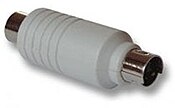
Most of time we have heard about software key logger. This software key-logger activates once Operating system starts but here is Hardware key-logger it will log every key stroke from the moment computer is turned on.Typically the memory capacity of a hardware keylogger may range from a few kilobytes to several gigabytes, with each keystroke recorded typically consuming a byte of memory. So beware of such device in public system before using sensitive data and secure web-pages like Internet banking. Here is types of Hardware key-logger.The first one is very simple it can be used with keyboard port very easily.

     
  1. A Regular Hardware Keylogger is used for keystroke logging by means of a hardware circuit that is attached somewhere in between the computer keyboard and the computer. It logs all keyboard activity to its internal memory which can be accessed by typing in a series of pre-defined characters. A hardware keylogger has an advantage over a software solution; because it is not dependent on the computer's operating system it will not interfere with any program running on the target machine and hence cannot be detected by any software. They are typically designed to have an innocuous appearance that blends in with the rest of the cabling or hardware, such as appearing to be an EMC Balun. They can also be installed inside a keyboard itself (as a circuit attachment or modification), or the keyboard could be manufactured with this "feature". They are designed to work with legacy PS/2 keyboards, or more recently, with USB keyboards. Some variants, known as wireless hardware keyloggers, have the ability to be controlled and monitored remotely by means of a wirelesscommmunication standard. 
  2. Wireless Keylogger sniffers - Collect packets of data being transferred from a wireless keyboard and its receiver and then attempt to crack the encryption key being used to secure wireless communications between the two devices.
  3. Firmware - A computer's BIOS, which is typically responsible for handling keyboard events, can be reprogrammed so that it records keystrokes as it processes them.
  4. Keyboard overlays - a bogus keypad is placed over the real one so that any keys pressed are registered by both the eavesdropping device as well as the legitimate one that the customer is using.[
Read More

Windows 8 Beta for Consumer Download from Feb 29


Did you know that 2012 is a leap year and Microsoft plans on making good use of the day, which comes just once every four years. Microsoft will release Windows 8 Beta for public download from February 29,. The Beta will officially be known as “Windows 8 Consumer Preview” and will be made available to users to download and try out. Like all public Betas from Microsoft, there will be an expiration date, telling you till when you’ll be able to use it, but like always, there will be a hack out that will allow you to bypass that and use it for a longer period.
Read More

Monday, January 16, 2012

Information Security Awarness Tutorials

 Here are few Security tips on day to day Information security related aspects

Be careful while downaloding applications through bluetooth or as MMS attachment . They may contain some harmful software which will affect the Mobile phone

1) Delete the MMS mesage receiver from and unknown user without opening it
2) Read the mobile phone operating instaruction carefully mainly regarding the security,pin code setting,bluethooth setting,infrared setting and procedure to downlaod an applications
3) Keep the Bluetooth connection in an invisible mode or hidden mode ,unless you need to use

Know the risk and take precaution before opening your Wi-fi Network to others
1) Use a strong password and google wireless encryption.
2)Don't broadcast your SSID and MONITOR your network for intruders
3) Shut down the network when its not being used and your wireless network interface also

Always used latest verion of browser and update daily
1)Remove the remember password option and enable all the security option that are avaliable in browser
2) Always perform transaction like online shoping,banking in secured and trusted site
3)Always delete cookies before and after financial transaction.

Alwasys use Strong(hard to guess) and easy to remember password
1)Always have minumum 8 character with combination of alphabet,lowercase,uppercase,number and special character
2)Use different pasword for different sccounts and never use last three used passwords
3) Never write your passwords anywhere
4)Use passphrases and simple keys to build as many as password such as I LoveMycountry ~ ILov5My3ountry
here keys for e=5 and c=3

Read More

Sunday, January 15, 2012

Free Partition manager and Recovery File Software

 MiniTool Partition Wizard Home Edition is a free partition manager software designed by MiniTool Solution Ltd. Partition manager supports 32/64 bit Windows Operating System including Windows XP, Vista and Windows 7. Home users can perform complicated partition operations by using this powerful yet free partition manager to manage their hard disk. Functions include: Resizing partitions, Copying partitions, Create partition, Delete partition, Format partition, Convert partition, Explore partition, Hide partition, Change drive letter, Set active partition, Partition Recovery

MiniTool Power Data Recovery is an all in one data recovery software. User can recover lost data from hard disk, CD/DVD disk, memory stick, memory card and USB flash drive. It can recover data after accidental deletion, recover data from formatted partition, deleted partition and damaged partition. With MiniTool Data Recovery Boot Disk, user can also boot computer directly to recover data after system crash, hard drive crash.


Read More