Sunday, November 2, 2025

New Update from UIDAI for Aadhar

A Step Towards Digital India: Now Update Aadhaar from Home, Free Facility Until 2026...

You no longer have to visit Aadhaar centers to update your Aadhaar. UIDAI has launched a facility that allows you to update your bank, mobile, or name and address information online from the comfort of your home. This facility is completely free and will remain available until June 14, 2026.

According to UIDAI, those who wish to change information on their Aadhaar card, such as mobile number, email, name, or address, can do so online through the official website or mobile app. However, a visit to a center will be mandatory for biometric or photo updates.

Fees for Aadhaar updates have been fixed—₹75 for name, address, or mobile number updates,₹125 for biometric updates, and₹50 for photo updates.

Furthermore, the eKYC process for bank accounts has also been simplified. Customers can now complete eKYC at their bank or financial institution.

Additionally, every PAN card holder is mandated to link their PAN with Aadhaar by December 31, 2025. Failure to do so may impact financial and tax-related transactions from January 2026.
Read More

Thursday, October 9, 2025

Pay using BHIM apps without Bank account


What is UPI Circle / BHIM Circle

UPI Circle is a delegation / sharing feature introduced by NPCI that lets a primary user (i.e. the main account holder) authorize secondary users (trusted family, friends, caretakers) to initiate UPI payments from the primary user’s linked bank account. 

The idea is to allow people who may not be comfortable managing digital payments (elderly, dependents) to transact via someone they trust, while still giving the primary user oversight and control. 

At launch, this feature was available in BHIM app version 4.0.2 and above. 

Key Features & Modes of Delegation

UPI Circle supports different modes / levels of delegation:

Feature Description

Number of secondary users A primary user can authorize up to 5 secondary users. 

Partial Delegation (Approve Every Payment) The secondary user can initiate a transaction, but the primary user must approve each one in real time (by entering UPI PIN) before it is completed. 

Full Delegation (Spend with Limits) The secondary user can transact independently up to a limit set by the primary user — no need for approval each time (as long as the transaction is within the allowed limits). 

Transaction / Monthly Limits In full delegation mode, the per-transaction limit is ₹5,000, and the monthly limit is ₹15,000. 

Transparency / Control All transactions by secondary users are visible to the primary user. In partial mode, each request must be approved. The primary user retains control to modify or revoke permissions. 

Interoperability / Cross-platform UPI Circle is becoming interoperable across UPI apps (BHIM, PhonePe, Google Pay). That means primary and secondary users can be on different UPI apps and still use the feature. 

Useful for families: e.g. a parent lets a child make small payments (school fees, snacks), but retains control. 

For elderly / dependents: a caregiver can help manage payments for them, while the elderly person remains in the loop. 

For small businesses or helpers: owners can let trusted staff initiate payments (for fuel, supplies) under limited authorization. 

Promotes financial inclusion: individuals who may not have bank accounts or are less tech-savvy can still transact via trusted persons. 

How to Use / Set Up UPI Circle in BHIM

Here’s a step-by-step guide based on available sources:

Update BHIM app

Ensure your BHIM app is version 4.0.2 or later. 

Open UPI Circle section

Within BHIM app, look for “UPI Circle” in the menu or home page. 

Add Secondary User

You can add by entering their UPI ID or by scanning their QR code. 

The secondary user must accept the invitation. 

Choose Delegation Type

Approve Every Payment (Partial Delegation).

Spend with Limits (Full Delegation).

Set limits (monthly / per transaction) if choosing full delegation. 

Confirm / Authorize Setup

Once settings are configured, confirm using UPI PIN or as required. The setup may take a few minutes to become active. 

Operate

Secondary user initiates payments (within their access).

If partial mode, request goes to primary for approval.

The transaction is completed only after primary approves.

Primary can monitor, edit, or revoke access any time. 

Limitations & Considerations / Things to Note

Even with full delegation, there are limits: typically ₹5,000 per transaction and ₹15,000 per month. 

In partial delegation mode, the daily UPI limits (that apply to your account) still apply. 

The feature requires both parties to use UPI and compatible apps. Secondary users must accept the invitation.

The feature was initially limited to BHIM, but cross-platform interoperability is being introduced, meaning primary & secondary can be on different UPI apps. 

You must trust the secondary user, even if there are limits — misuse is possible if permissions are mis-set.

The feature is new, so some bank/UPI apps may roll out support gradually.


Read More

Thursday, June 12, 2025

Get Your Unique Location Code: DIGIPIN by Indian Post


The Department of Posts has undertaken an initiative to establish a Digital Public Infrastructure (DPI) for a standardized, geo-coded addressing system in India. As a part of this initiative, The Department has finalised DIGIPIN – the foundation layer of the DPI. This initiative seeks to provide simplified addressing solutions for seamless delivery of public and private services and to enable “Address as a Service” (AaaS) across the country. DIGIPIN is an open-source national level addressing grid developed by Department of Posts in collaboration with IIT Hyderabad and NRSC, ISRO and is a key component of the digital address ecosystem. The advent of DIGIPIN will mark a revolutionary step in India's journey towards digital transformation by bridging the crucial gap between physical locations and their digital representation.

Read More

Monday, May 15, 2023

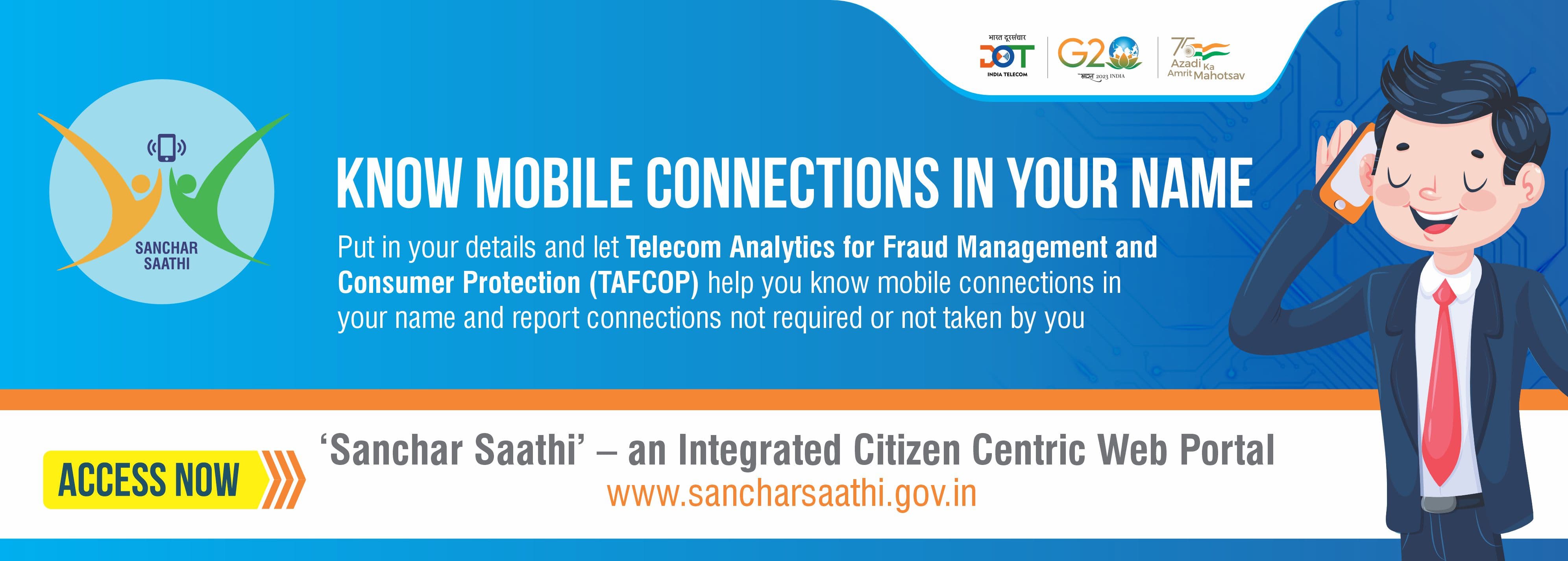
Sanchar Saathi portal : Track /Block Your Lost Mobile


 The Department of Telecommunications has launched the Sanchar Saathi portal to provide citizens with tools to manage their mobile connections and increase awareness about government initiatives. The portal enables users to identify mobile connections issued in their name and disconnect any unnecessary connections. It also offers features to block or trace lost mobile phones and verify the authenticity of devices when purchasing new or used phones. Refer this link to know mobile number owner

One of the modules on the Sanchar Saathi portal is the CEIR, which assists in tracing lost or stolen mobile devices and blocking them on all telecom networks in India to prevent their misuse. If someone tries to use a blocked mobile phone, its traceability is generated, and once the phone is found, it can be unblocked on the portal for normal use by the citizens.

The TAFCOP module allows mobile subscribers to verify the number of mobile connections taken in their name and report any connections that are not required or not taken by them.

Additionally, the portal includes a "Keep Yourself Aware" facility that provides users with the latest updates and awareness material related to end-user security, telecom, and information security.


For Quick User Manual Refer this link 

Read More

Monday, March 27, 2023

Get Jeewan Praman using Aadhar Face Authentication by smartphone


Enhancing Ease of Submitting Digital Life Certificate through Face Authentication Technique based on

UIDAI Aadhaar software for Digital Life Certificate submission by pensioners using only a smartphone.

Process flow as given below:-


1) Download AadhaarFaceRd App from Google Play Store

2) After the Rd service is installed, it will be visible in Settings App Info as shown in screenshot.

3) Download  Jeevan Pramaan Face Application from

https://jeevanpramaan.gov.in/package/download or download from Google Play store  

Click on Client Installation Document for Android Face App.

4) Provide required information -> a link will be sent to the mail ID provided -> Click on link -> file gets downloaded in downloads click on file to install app

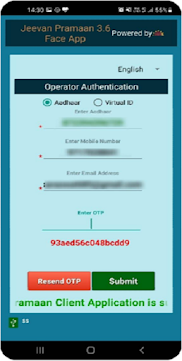
5) Open app -> give required permissions-> this opens a screen for Operator Authentication-> give required information -> submit-> enter OTP-> 

Scan face of operator-> on being successful,

pop-up will appear "Client registration successful"

6) The operator authentication IS a one time process. Pensioner can also be the Operator.After operator authentication, a screen will open for pensioner authentication. One operator can generate DLC of multiple pensioners.

7) Fill in all the details as on the screen correctly, Click on both the checkboxes and submit.

8) Click on the checkbox and scan for live photograph.

9) In this pop-up window select "yes" to continue with the scan process.

10) Click on the checkbox and proceed.

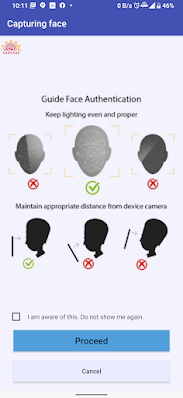
11) While doing Face Authentication keep your face straight and follow the instructions shown on screen.

12) After face scanning DLC submission appears on the mobile screen along with the Pramaan ID

and PPO no.

Read More

Sunday, April 18, 2021

Made in India eCommerce website : www.bharatemarket.in

 Traders' body CAIT on  launched a vendor onboarding mobile app for its upcoming e-commerce portal 'Bharat e Market'. The app will enable businesses and service providers to register on the portal and create their own "e-dukaan". This portal  is significant initaive for Local for Vocal.

The Confederation of All India Traders (CAIT) said its 'purely Indian' Bharat e Market portal will comply with all the rules and regulations of the country.

This platform has option to register buyer and seller neither this portal charge any commisssion . There is no registration fee for seller .CAIT has developed its Bharat e Market portal which will provide both B2B and B2C business opportunities.

No Chinese goods will be allowed for sale on the portal, adding that special emphasis will be accorded to products made by women entrepreneurs, artisans and craftsmen

CAIT has been engaged in a tirade against foreign e-commerce companies, accusing them of violating the country's FDI policy norms -- a charge denied by the firms.


Read More

Saturday, April 17, 2021

Lock Aadhar number when it is lost


You all know the importance of Aadhaar Card and in today's time

it has become the most important document. In a situation, if the Aadhaar card is lost or misplaced, then you may be in trouble.
Because there is a risk of your data being leaked when someone comes in the hands

of the wrong person.
In such a situation, if Aadhaar is lost, first block it and for this you do not need
to go anywhere
Explain that once the Aadhaar card is locked, hackers cannot do Aadhaar verification

without your permission.

Your data will also be completely safe.
You do not even have to go anywhere to lock and unlock the base. This is how you can lock the base If the Aadhaar card is lost, first of all lock it for the safety of its data.

For this, you have to send SMS by writing GETOTP on 1947.

After this, OTP will come on the phone of the holder.
Message this OTP to 1947 again by writing 'LOCKUID Aadhaar Number'.

After sending this message, your Aadhaar number will be locked.


How to Unlock ?
After locking the Aadhaar number, you can also unlock it later.
You have to write GETOTP Aadhaar number from your register mobile number

and send it to 1947. After which you will receive an OTP.

After this, after writing the UNLOCKUID Aadhaar number and OTP,
you will have to send a message to 1947 again.
Just by doing this, your Aadhaar number will be unlocked.

Read More

Sunday, January 24, 2021

Get Downloadable e-Voter ID from Jan25

Election commsion  is all set to digitise the voter ID cards on their mobile phones and personal commuters. Now Voter can get downloable Voter card as e-version same as e-aadhar card and e-PAN

This e-version of the voter ID card is a non-editable digital version of the elector photo identity card which can be saved in facilities such as Digi Locker or printed in a PDF format, said the Election Commission officials.

On the occasion of 11th National Voters' Day , Law Minister Shri  Ravi Shankar Prasad will on Monday launch electronic version of the voter identity card, termed launch the e-EPIC (Electronic Electoral Photo Identity Card) programme, which can be downloaded on mobile phone or personal computer.

This  initiative would be launched in two phases. In the first phase from January 25 to 31, all new voters who have applied for the voter-ID card and registered their mobile numbers in Form-6 will be able to download the e-EPIC by simply authenticating their mobile number.


The mobile numbers should be unique and not be previously registered in the ECI's electoral rolls.

The second phase will start from February 1. It will be open for the general voters. All those who have given their mobile numbers (linked one) they can also download their e-EPIC.

A digital version of the Elector Photo Identity Card can be accessed through the Voter Helpline App and websites https://voterportal.eci.gov.in/ and https://www.nvsp.in/.


Read More

Friday, May 1, 2020

Free OPD Health Service from your home by C-DAC : eSanjeevaniOPD

Mohali’s Centre for Development of Advanced Computing (C-DAC) has developed telemedicine solution–eSanjeevaniOPD to provide tele-consultation services to patients through safe and structured video-based clinical consultations nationwide.

The telemedicine solution has been developed for ministry of health and family welfare government of India (MoHFW). With this facility, a patient can consult a doctor at his residence or the hospital. The OPD facility can be accessed through the web site www.eSanjeevaniOPD.in.

The patient can have a free face-to-face consultation with doctor, as well as enter demographics, upload reports and obtain ePrescription which is honoured by pharmacies. National and state level statistics have been made available to key functionaries on a daily basis.

The current offering is a first-of-its-kind patient to doctor consultation, scalable to large numbers that are expected in a national roll out.”

These services are being offered by respective state governments free of cost. Nine states/UTs namely Andhra Pradesh, Arunachal Pradesh, Assam, Himachal Pradesh, Karnataka, Maharashtra, Puducherry, Punjab,Jharkhand,Haryana and Uttar Pradesh have rolled out eSanjeevaniOPD for their population. Ten states/UTs including Chandigarh, Chhattisgarh, Jharkhand, Madhya Pradesh, Mizoram, Rajasthan, Uttarakhand and West Bengal are in the process of rolling out the facility.

Read More

Friday, April 24, 2020

Download e-aadhar by Face Authentication : No need to have registered mobile number.


If you want to download a copy of the Aadhaar card right now, you must have a registered mobile number in your Aadhaar . Because e Aadhaar card can be downloaded only after verification by OTP, the Aadhar card holders whose mobile number is not registered in the Aadhaar card, were not be able to download the Aadhaar card online.
Most of 70% of the Aadhaar cards do not have their mobile numbers registered

From UIDAI portal has provided a alternative option to download via Face recognition as a pilot project.  If the mobile number is not registered in the Aadhar card of Aadhaar card holders, then they can download the copy of Aadhaar card online only by showing their face, for this, it is not necessary that their Aadhar card has mobile Number should be registered.

This is, benefit of this new facility will be available to such people whose mobile number is not updated or registered in the Aadhaar card yet.

Face Aadhaar Card Download / Download Aadhaar card Using Face Authentication

This facility is not yet provided on the official UIDAI website, to use it, you have to use the link given on this website

How to download Aadhaar card by showing face

1)  First you have to click on this given link. https://eaadhaar.uidai.gov.in/faadhaar/

2)  By clicking on the link, you will go to the UIDAI website and you will see some options here which we have shown you below.

You have to fill captcha code and click on the option of FACE AUTH.

3)  If you are doing this process in your mobile, then by clicking on face auth, your front camera will start working, similarly, if you are doing this whole process through your laptop then the laptop camera Will start working and if you are doing this process through the desktop you will have to use the webcam.

4)  As the camera starts working, it will have to bring its face in front of the camera and keep its face steady for some time so that it can be captured.

5)  As your face is captured, a survey form opens in front of you, in this survey form you have to answer two small questions.

6) Once Biometric detail is verified then you will have option to download the e-aadhar card.

Note: This service is primarily based on Face recognition which is more of research oriented ,Hence we cannot expected 100 % accuracy .Although it is quite good in image identification

If someone has locked their Biometric then this will not able to authenticate. Hence in-order to use biometric authentication user need to have his biometric detail in Un-locked mode.

Read More

Tuesday, June 18, 2019

Finally Microsoft has updated Windows 10 (May 2019) with Indic Phonetic keyboards for 10 indian languages


In order make technology accessible and productive for people of India who speaks different Indian language , Microsoft India has provided new Phonetic keyboards in Indian languages to Windows 10 user as May 2019 updates. The new feature is available in 10 Indian languages including Hindi, Bangla, Tamil, Marathi, Punjabi, Gujarati, Odia, Telugu, Kannada and Malayalam. The new Indic Phonetic keyboards are in addition to the Indic Traditional INSCRIPT keyboards already available with Windows.

 The keyboards now allow Indian users to work in their native/preferred languages unlike before when many of them had to purchase customized Indic hardware keyboards or stickers. This has made it simple for users to input transliterated Indic text using the existing keyboards which traditionally have Latin characters inscribed on them. Transliteration, unlike translation, automatically converts text from one script to another. For instance, if we type ‘Bharat’ in Latin characters, the Phonetic keyboard will transliterate final output to भारत (Hindi), ভারত (Bengali), ભારત (Gujarati) or ਭਾਰਤ (Punjabi) depending on the target language.


Read More

Thursday, July 12, 2018

How to chat on Whatsapp without adding phone number on Contact

WhatsApp's Click to Chat feature allows you to begin a chat with someone without having their phone number saved in your phone's address book. As long as you know this person’s phone number, you can create a link that will allow you to start a chat with them. By clicking the link, a chat with the person automatically opens. Click to Chat works on both your phone and WhatsApp Web.

To create your own link, use https://wa.me/ where the is a full phone number in international format. Omit any zeroes, brackets or dashes when adding the phone number in international format. For a detailed explanation on international numbers, read this article. Please keep in mind that this phone number must have an active account on WhatsApp.

Use: https://wa.me/15551234567

Don't use: https://wa.me/+001-(555)1234567

Example https://wa.me/919XXXXXX011

Always prefix 91 on Indian number . Do not add +91.


Read More

Friday, April 20, 2018

UIDAI Updates Aadhar QR code for offline verification


UIDAI has introduced an new updated 'QR code' on Aadhar card which will now have details like name, address, photo, and date of birth.Earlier Photograph was not embeded in QR code .For  offline user verification can be done  without  providing the 12-digit aadhar number. number.

This would be especially handy for establishing the identity with non-statutory entities, say, the likes of online shopping portals when delivering goods.

Aadhaar holders can download and print their biometric ID with the QR code from the website of Unique Identification Authority of India (UIDAI) or its mobile app.
A QR code is a form of barcode label which contains machine-readable information.
Users can manually blacken the Aadhaar number and use the printout with the new QR code for establishing their identity, offline too.


For example, when an online shopping delivery delivers the item and  delivery man asks for ID, Aadhaar holder can show him the printed QR code which when scanned (through an updated QR code reader on Aadhaar site) would read non-sensitive information.With this name, address, date of birth and photo, can be feteched and thus easily identity, It will also ensure that Aadhaar holder is genuine and not using any tampered ID documents.


Ajay Bhushan Pandey, CEO of Aadhaar-issuing body UIDAI, said: "The offline QR code is a landmark development which will allow everyone to establish their identity through offline verification without giving out Aadhaar number".
He added: "Only in those places where Aadhaar number is required under the law including banks, telecom companies, or for availing subsidies, one will have to go through the authentication process.
Read More

Tuesday, April 17, 2018

TRAI new portal for tariff for all Telecom Operator

TRAI has came with new portal http://trai.gov.in/tariff , for now, is in beta stage and displays all the regular tariffs, STVs (special tariff vouchers), promotional tariffs and value-added service plans. The motive to the portal is to display the tariff of all the operator on single portal

Currently , Trai will be collecting extensive feedback from the public, and in the future, the regulator will add all the circle plans in the portal, but it’s going to take a while. As of now only operators of DELHI circle is added .

 Trai has made this website in downloadable format where user can download the tariff in excel format This  would help the consumers do a comparative analysis.

The stakeholders and public should give Trai the feedback on the initiative within 15 days. The feedback could be of the look, feel and utility of the portal. Post the feedback, Trai will be add other circle’s tariff plans.

Read More

Tuesday, March 27, 2018

Create Virtual ID for your Aadhar card

Finally UIDAI has implemented Virtual ID creation in Beta phase . Now user need not worry about telling their aadhar number to unknown person .Virtual ID acts a wrapper over aadhar number . Is mask your aadhar number with 16 digit random number. Wherever aadhar card number is required you can provide you virtual ID that is 16 digit number.The 'Virtual ID' will be made compulsory for all agencies undertaking authentication from June 1, 2018.Agencies failing to meet the above deadline will be faced with financial disincentives

How to Generate your 16 digit Virtual ID ?
===================================
Pre-requisite : Your valid registered mobile number should be added to your Aadhar data to receive OTP for authentication

1) Navigate to this URL https://resident.uidai.gov.in/web/resident/vidgeneration
2) Enter your Aadhar number .
3) Enter the OTP that you got on your registered mobile number.
4) For first time user click on Generate VID
5) Then Submit the form .

After successful verification of OTP your VID ( that is Virtual ID ) will be provided on your registered mobile number as SMS.

In case user forget this VID that is Virtual ID then they can follow same steps mention above but only in 4th step you need to select option for Retrieve VID .

By this method now you need not to share Aadhar number .All you need to share your Virtual ID .

What is Virtual ID

The Virtual ID is a random 16-digit number.
*The ID can be generated as many time as possible.
*The older ID gets automatically cancelled once a fresh one is generated.
*Users can go to the UIDAI website to generate their virtual ID which will be valid for a defined period of time, or till the user decides to change it.
*The ID, along with the biometrics of the user, would give any authorised agency, like a mobile company, limited details like name, address and photograph, which are enough for any verification.
*Agencies that undertake authentication would not be allowed to generate the Virtual ID on behalf of the user.
*UIDAI also introduced the concept of 'limited KYC', which will provide need-based or limited details of a user to an authorised agency providing a particular service
*The 'Virtual ID' will be made compulsory for all agencies undertaking authentication from June 1, 2018.Agencies failing to meet the above deadline will be faced with financial disincentives


Read More

Tuesday, January 2, 2018

Reverify your mobile connection with aadhar by just calling 14546

you’re looking to link your mobile number with Aadhaar with the new IVRS method, here’s how you can do it.

1) Dail 14546 from your mobile phone and wait for the IVR voice.
2) Once the call gets connected, you will be asked to select the language. Select language as per the instructions.
3) Now, you will be directed to enter the Aadhaar number. Once after you entering the Aadhaar number, telecom operator will send the Aadhaar details entered by you to UIDAI for verification.
4) Once verified, you will receive an OTP, which you need to enter during the call itself. After entering the OTP, the call can be disconnected. After that, you will receive a confirmation SMS.

That’s it; there’s no need to visit any operators store like earlier

Read More

Get History for Aadhaar Authentication online

Now a days 12 digit Aadhar is very important to Indian citizen.Various service is using aadhar authentication to verify the identity like SIM connection ,Gas Connection or even in some digital payment.

UIDAI has make the provision to view the history of authentication where citizen has made. This enable citizen to make aware of any unwanted authentication that he/she has not done.

Here is simple steps by which you can access authication history.

Navigate to  the official website of UIDAI's Aadhaar Authentication History page (https://resident.uidai.gov.in/notification-aadhaar)
2) Enter your 12-digit Aadhaar number and the captcha code shown on the screen
3) Click on Generate OTP button.
4) Enter the OTP sent to your mobile number registered in the Aadhaar data

The page  that opens, contains specific authentication request types such as biometric, demographic, and so on from the filter option. It also allows you to select the date range — but only up to six months before the current date.
6) You will have to do the OTP verification once again here

 Once OTP is verified, you will be able to see a detailed list of Aadhaar authentication requests. Here, you can check the date, time, and type of authentication request.
In case you see any Aadhaar authentication data which was not requested by you, you can raise the issue with UIDAI.
Read More

Tuesday, September 19, 2017

Google introduce new Digital payment method based on UPI


In this era of Digital era Google has introduced a new payment apps. Please do not confused with wallet. This is not at all wallet . This is UP based Payment method. This apps  pay directly from your bank account, that means your money is safe with your bank and you’ll not going to lose intrest. Here user no need to open a separate account or worry about reloading wallets.
It uses your Google account to get registered. It provide two leyer security one for Google account PIN and another for UPI PIN. This Google PIN do not reside on your mobile apps. This Google PIN reside at Server end.
Tez uses UPI (Unified Payments Interface) and works with all major banks, including our partners: Axis, HDFC Bank, ICICI and State Bank of India. Tez makes it faster and more secure to pay on apps and websites – anywhere that UPI is accepted. When you check out, look for the Tez logo or use your Tez UPI ID.

Currently Tez supports all major Indian banks and  smartphones with KITKAT or Above .
It language support for English, Hindi, Bengali, Gujarati, Kannada, Marathi, Tamil, and Telugu, sending money is easy to understand.

This apps also suits the Business need . Shop Owner can use the Tez app with their individual bank account to start accepting digital payments today. Payment goes directly to your bank account . There is no fees for such transaction .

The most intresting feature of this apps is its CASH mode . This mode enables you to send money without sharing your phone number/email id or any bank detial or any UPI detail. In this mode user need to enable cash mode in apps. As soon as user enable it the mobile phone generate a Utrasonic Audio QR code which is to be recived by reciver end. Here Reciver also need to enable cah mode to recive the fund. Once the reciver reciver get the audio QR code then sender and send the money.

Please note this not based on NFC technology and neither you require any specific feature enabled smartphone. All you need a smartphone with mic and speaker.

Please do visit Google Tez youtube channel to understand better.
Read More

Thursday, July 20, 2017

Share Any File Type on Whatsapp with new update

Image result for whatsappWhatsApp has started  a new feature which helps user to send and receive any file.

Earlier it has  limited support for only pdf or word or image files. In new update, users can send any files including apk files and zip. It was one of the features most demanding by by what app user.

This feature is currently  available only for Android users .
Read More

Tuesday, July 18, 2017

Carry your Aadhar on your Mobile in mAadhar apps

In yet another good move by UIDAI ,Today they have launched android based apps mobile apps which enable user to carry their aadhar card digitally and share its information digitally.
You can download this apps and try from Google Play

In this apps you need to create profile using your aadhar number. For this you need to have registered mobile number on your aadhar detail. Here you can add multiple aadhar information for your family member also for quick reference. To use this apps you need to set a password first.

Lets list out option and feature for this  this apps

1) View Profile( Name ,Gender,DOB,Photo )
2) Address detail
3) Aadhar number
4 Share Profile : This is is very unique option which enables aadhar holder to share their profile information and address with service provider through QR code,Near Field communication (NFC),email. If you are going to share by email then it will contain a ZIP file which will have a data in XML format with all the relevant filed of Aadhar field

5) This apps also provide to lock bio metric option that means If you have lock the bio metric data then you cannot authenticate using your thumb and iris data.It is recommended to keep the bio metric lock  disable which will help to authenticate e-KYC as when required by various agency. Further still someone whats to keep a lock on their bio metric then this is very good to keep the bio metric detail in lock mode . With the help of this apps you can enable lock mechanism and apply lock on your bio metric detail and whenever you require to authenticate using your bio-metric detail you can unlock it temporarily for 30 min. After 30 min it will automatically get locked.

The Best part I liked in this apps is Locking mechanism of Bio-metric detail which helps to keep bio-metric detail  safe. Further there can me one more enhancement in this apps which will help to download Full PDF version of Aadhar.If  user can download Aadhar in PDF on apps and and user can share this then it will be a one more handly way to share aadhar card.


Read More